
1win Mines Malaysia: Grid Mechanics, Mines Count and Cashout
Mines on 1win is a grid-based game with a completely different rhythm from a crash game or a ball-drop game: a player chooses how many mines are hidden among a grid of cells, then reveals cells one at a time, watching a cashout multiplier grow with each safe reveal until either a cashout is taken or a mine ends the round. This page covers how the grid and mines count work, the risk-and-reward tradeoff behind that choice, how revealing cells builds the cashout multiplier, manual cashout and session controls, mobile play, and where to check current demo availability. For the broader range of games covered on this site, the 1win-game.my home page is the starting point beyond Mines alone.
Last reviewed: August 2026.
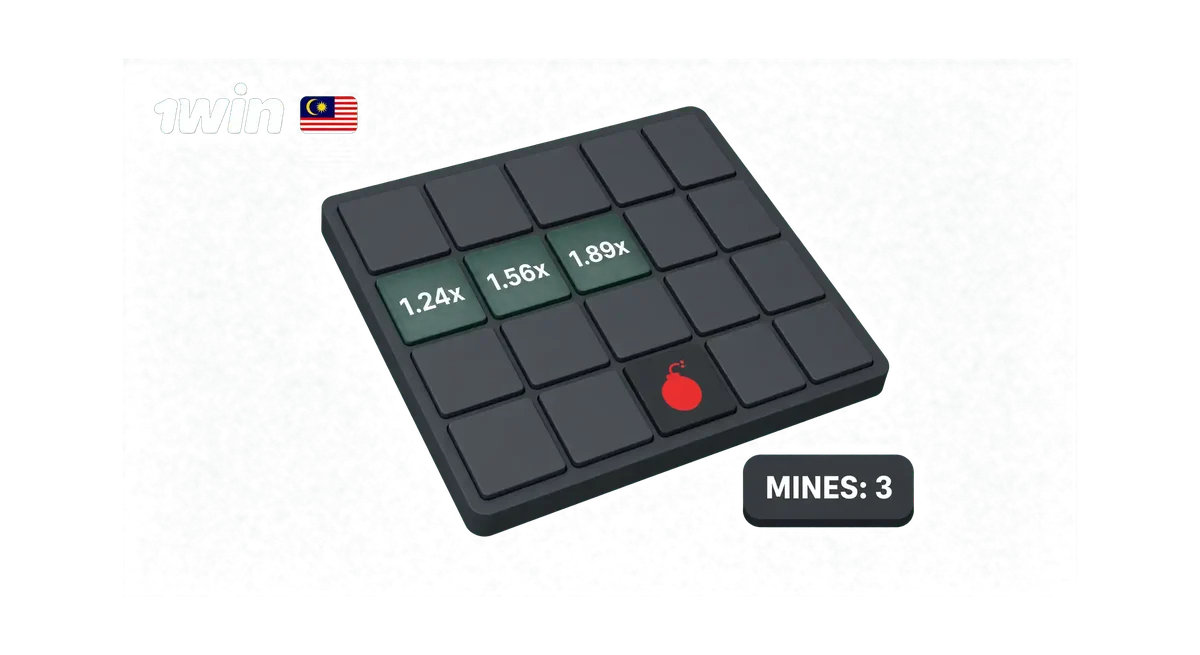
Key Takeaways
- Mines is a grid-based game: a chosen number of mines is hidden among the grid’s cells, and revealing a safe cell raises a cashout multiplier while hitting a mine ends the round.
- More mines chosen on the grid generally means a higher potential multiplier per safe reveal, paired with a higher chance of hitting a mine on the next pick.
- Cashout is manual: the player decides when to stop and collect the current multiplier, rather than the game cashing out automatically.
- Mines is part of 1win Originals, the platform’s own in-house game label. Demo availability can depend on which version is currently live in the catalog.
- Mine locations are placed randomly each round; no cell-picking pattern or order improves the odds of avoiding one.
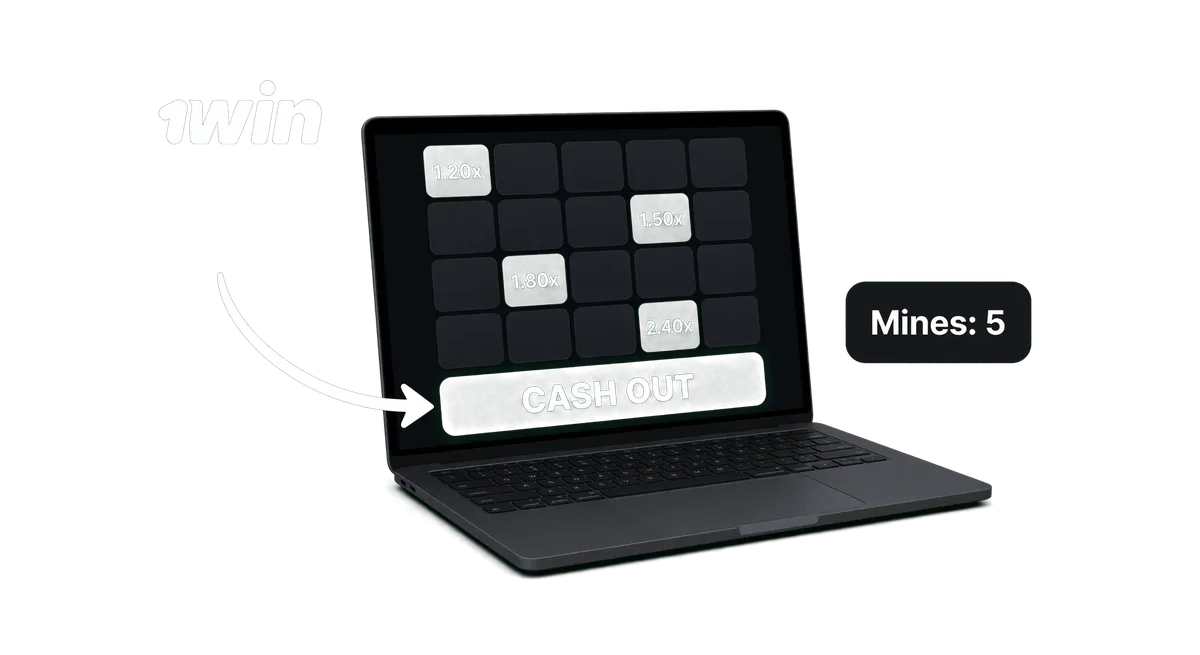
The Mines Grid Game: How the Board Works
Mines presents a grid of covered cells, with a chosen number of mines hidden randomly somewhere among them before a round begins. Mines is part of 1win Originals, the platform’s own in-house game label, the same family as Lucky Jet. Once a stake is set and the round starts, cells can be revealed one at a time by tapping or clicking on them. Each cell that turns out to be safe adds to a running cashout multiplier, and the grid stays open for further reveals as long as a mine hasn’t been hit. Hitting a mine on any reveal ends the round immediately, and the stake for that round is lost, regardless of how many safe cells were revealed beforehand. The grid layout and the exact range of mines available to choose from can vary depending on the game’s current version, so the in-game settings panel is the place to see the current options rather than a fixed figure stated here. Every cell’s outcome is decided independently of what a player might expect based on grid position, since mine placement is randomized fresh at the start of each round.
Choosing How Many Mines: Risk and Reward
Before a round starts, a player picks how many mines are hidden on the grid, typically from a configurable range offered inside the game. Choosing fewer mines generally means more of the grid is safe, so each individual reveal carries a lower chance of hitting one, though the multiplier gained per safe reveal tends to be smaller as a result. Choosing more mines shrinks the safe portion of the grid, raising the chance that any single reveal turns out to be a mine, but the multiplier gained per safe reveal in that setup tends to be larger to reflect the added risk. This tradeoff is decided once at the start of the round, before any cell is revealed, and it isn’t something that can be changed partway through without starting a new round. There’s no mines count that removes the underlying risk. A higher mines count simply moves more of that risk toward each individual reveal, in exchange for a faster-growing multiplier while things go well.
Revealing Cells and the Cashout Multiplier
Each safe cell revealed on the grid increases a running cashout multiplier that applies to the stake if a cashout happens at that point. The multiplier generally grows with each consecutive safe reveal, reflecting the fact that fewer safe cells remain unrevealed and the risk of the next pick has typically gone up. No specific multiplier value or growth curve is fixed here, since the exact figures depend on the number of mines chosen and the current version of the game running at the time; the in-game display during a round is the place to see the live multiplier as it updates after each reveal. A round can continue as long as safe cells keep getting revealed, right up until either a mine is hit or a cashout is taken, whichever comes first. There’s no set number of reveals a round is expected to reach. It’s entirely dependent on how the reveals happen to land on a given attempt.
Manual Cashout: You Decide When to Stop
Cashing out in Mines is a manual action: after any safe reveal, a cashout button becomes available, and tapping or clicking it locks in the current multiplier and ends the round on that stake. There’s no confirmed auto-cashout feature for Mines. If a control like that appears inside the game in the future, it should be confirmed directly rather than assumed to work the same way it does on other titles. Since cashout is manual, the decision to keep revealing another cell or stop and collect sits entirely with the player at each step, and that decision has to be made before knowing what the next cell would have revealed. Session controls otherwise stay simple: a stake set before the round, a mines count set before the round, and a sequence of reveal-or-cashout decisions once the round is underway.
Mines Demo: Checking What’s Currently Available
Demo availability for Mines can depend on which version is currently live in the catalog, unlike some of the other games covered on this site where a free-play mode is consistently confirmed. The in-game lobby toggle is the reliable place to see whether a virtual-balance version is currently offered before playing with real funds. Where a demo isn’t showing, setting a low stake for early rounds is a more realistic way to get familiar with the grid, the mines-count tradeoff, and how the cashout multiplier grows than assuming a practice mode will appear.
Playing Mines on Mobile: Tap Interaction
Mines runs directly in a mobile browser, and the grid scales to fit a phone screen with each cell sized to be tapped individually without needing precise placement. Revealing a cell on mobile is a straightforward tap on that cell, and the cashout button stays visible and reachable throughout the round so a cashout decision doesn’t require scrolling or switching screens. Since the mines count and stake are both set before a round starts, those selections are usually made through a simple tap-based menu on mobile rather than typed input. A stable connection is worth having before starting a round, particularly on a session where no demo mode is currently showing, since a connection issue during a real-money round can’t be undone.
Provider Background, Comparison and a Note on Randomness
Mines is built in-house under the 1win Originals label, the same family as Lucky Jet; general background on the studios behind the games covered on this site, including the third-party ones, sits on the game providers page. Mine placement is randomized fresh at the start of every round, and no cell-picking order, pattern, or personal habit changes where the mines happen to be sitting on a given grid. Revealing cells in the same corner first, or following any other fixed sequence, doesn’t make a mine less likely to be hit on the next pick, since each cell’s status was already fixed randomly before the first reveal happened. Anyone weighing Mines’ grid-and-reveal risk curve against Aviator’s rising multiplier or Plinko’s ball-drop spread can check the compare page for a side-by-side look at how the three mechanics differ.
FAQ
Does Mines have a free demo mode?
Demo availability can depend on which version of Mines is currently live in the catalog. The in-game lobby toggle is the reliable place to check whether a virtual-balance version is currently offered.
Does choosing more mines always mean a bigger win?
It means a higher multiplier per safe reveal, paired with a higher chance of hitting a mine on the next pick. It isn’t a way to improve the odds overall.
Is cashout automatic in Mines?
No. Cashout is manual. A cashout button becomes available after each safe reveal, and the player decides when to use it.
Does the order cells are revealed in affect the odds?
No. Mine placement is randomized before the first reveal, so no order or pattern of picking cells changes where the mines are sitting.
What happens if a mine is revealed?
The round ends immediately and the stake for that round is lost, regardless of how many safe cells were revealed beforehand.
Does Mines work the same on mobile as on desktop?
Yes, in terms of what’s available. The grid, mines-count selector and cashout button all appear in the same basic layout, just resized and tap-friendly for a smaller screen.
1win operates under a Curacao gaming license, a regulatory framework that is separate from any Malaysian government approval. 18+.